

- AccurateRip
- Acoustid
- AES/EBU
- AirPlay
- Amplifier
- aptX
- Audio file formats
- ASRC
- AVB
- Bit perfect jitter
- Bits: 16 or 24
- Bit perfect playback
- Bitrate
- Bluetooth
- Burn-in
- BWF
- Cables
- CDtext
- Chromecast
- Clipping
- Clock
- Codec
- Compression
- CRC
- Crossover
- Cue sheet
- DAC
- Damping
- DASH
- Digital
- Digital Room Correction
- Dither
- DLNA
- Drivers
- DoP
- DSP
- EBU R128 (loudness)
- FFT
- FireWire
- Freedb
- Gapless playback
- Generation loss
- HDMI
- Headphone listening
- Hearing
- Hires recording
- Homeplug
- I2S
- ID3
- Inter sample peak
- LDAC
- Linearity (DAC)
- Memory playback
- Music Server
- OCF
- OFC
- PCM
- Perception
- RAID
- ReplayGain
- Ripping
- RFI
- RIAA
- Router
- Sampling, up and over
- Sample Rate Conversion
- Speakers
- S/PDIF
- Storage
- Sync
- Tagging
- Toslink
- Transcoding
- UAA
- Units
- UPnP
- USB
- VST
- WiFi
- WiSA
Bit Perfect Jitter
Digital audio is PCM (Pulse Code Modulation) audio most of the time.
It consist of two components, the value of the signal (represented by 16 or 24 bits words) and the time step (sample rate).
We have two components, the signal and the time.
Sounds logical but pretty often you hear the 'bits are bits' theory, implying that if the bits are right, everything is right. This theory leaves the other half, the time step, out of the equation.
To play PCM audio, the bits has to be translate to a equivalent voltage and this must be done with a time step matching the sample rate.
This is done by a Digital to Analogue Converter, a DAC for short.
The sample rate is generated by a clock.
As absolute perfection does not exist, there is always some fluctuation in clock speed.
This is called clock jitter.
Interface jitter is jitter introduced in the transmission of digital signals.
Noisy power supplies, improper grounding and electromagnetic interference could also induce jitter.
Crucial is the sampling jitter, deviations in the sampling interval in the DA conversion stage
According to the Redbook audio standard the clocks frequency should be within +/-100ppm (parts per million).
A deviation of 100 ppm means that a 440Hz tone deviates +/- 0.044Hz.
What is Jitter?
Jitter is time-base error. It is caused by varying time delays in the circuit paths from component to component in the signal path. The two most common causes of jitter are poorly-designed Phase Locked Loops and/or reflections in the signal path.
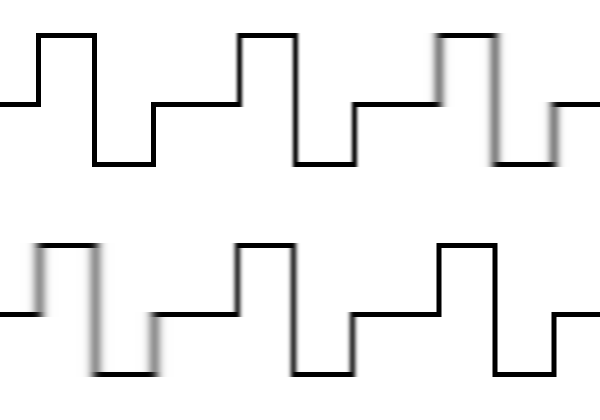
Here is how waveform distortion can cause time-base distortion:

The top waveform represents a theoretically perfect digital signal. Its value is 101010, occurring at equal slices of time, represented by the equally-spaced dashed vertical lines. When the first waveform passes through long cables of incorrect impedance, or when a source impedance is incorrectly matched at the load, the square wave can become rounded, fast risetimes become slow, also reflections in the cable can cause misinterpretation of the actual zero crossing point of the waveform. The second waveform shows some of the ways the first might change; depending on the severity of the mismatch you might see a triangle wave, a square wave with ringing, or simply rounded edges. Note that the new transitions (measured at the Zero Line) in the second waveform occur at unequal slices of time. Even so, the numeric interpretation of the second waveform is still 101010! There would have to be very severe waveform distortion for the value of the new waveform to be misinterpreted, which usually shows up as audible errors--clicks or tics in the sound. If you hear tics, then you really have something to worry about.
Source: http://www.digido.com/
If the jitter becomes too high, it becomes audible. The sound is often described as 'coarse'.
Severe jitter will cause timing errors to such an extent that the bit flipping occurs. Even flipping the LSB (the least significant bit) in 16 bit PCM (CD audio) is audible (clicks).
Random jitter
Random jitter is just noise. It degrades (reduces) the SNR but does not add any nasty tones to the signal.
Intrinsic jitter
No clock (oscillator) is perfect. There will always be some fluctuations in the cycle to cycle time.
Low jitter starts with a good quality clock.
Its absolute precision is less relevant than its cycle to cycle time precision.
Rubidium clocks can obtain an accuracy of 0.03 parts per Billion.
Deterministic jitter
Deterministic jitter is generated by a non-audio signal like power supply ripple, RFI, etc.
Deterministic jitter is much more insidious and I personally feel is the primary jitter component causing audible distortion. Deterministic means it is determined by some signal, and that is often not a signal we want in our system. These unwanted signals may not be related to the signal, and thus spurs from them really stand out to our ears. Even when related to the signal, deterministic jitter can reduce performance far more than random jitter by adding spurs that are much, much larger than simple random jitter (noise) adds.
Interface jitter
Most of the time the DAC is slaved to the sender.
It must read the data at the same rate the source is feeding it.
In case of a non-buffered input, it is almost directly coupled to the clock of the sender.
In case of a buffered input, speed adjustments are necessary to avoid buffer over/under flow.
Techniques to cope with input jitter (ranked from low to higher effectivity):
There are a few main techniques for dealing with interface jitter:
- Ignoring it altogether.
- Using a PLL to filter the interface jitter, providing a cleaner version of the clock reconstructed from the interface to the DAC.
- Using an Asynchronous Rate Converter ( ASRC ) to manipulate the data such that it "fits" in the two clock domains
- Using the DAC clock to drive the clock in the source ( "asycnchronous" modes - async USB, async firewire, most ethernet solutions, some kind of link from DAC to source )
The last is the best - assuming the same level of competency is applied in all cases, but all bets are off otherwise...
idiot_savant
Phase Locked Loop
PLL’s can reduce input jitter but they can’t suppress it completely.
Phase Locked Loop (PLL) circuits are used to filter clock signals. A PLL is an electronic equivalent to a flywheel. Prior to the CD, cheap record players were abundant. These often had lightweight stamped metal platters. In contrast, high-end turntables have massive platters to help them spin at a constant rate. A PLL stores and releases electrical energy in much the same way as a flywheel stores and releases mechanical energy. Some turntables have heavy flywheels, others do not. Likewise, some PLLs have a slow enough response, and enough inertia to adequately remove jitter, others do not. We can look at a turntable and see the size of the flywheel, but we can’t look at a digital converter and see the size of the “electronic flywheel” contained in the PLL circuit. Jitter attenuation specifications are essential for assessing the effectiveness of the PLL.
Asynchronous sample rate conversion
Asynchronous sample rate conversion (ASRC) can obtain good jitter rejection.
The math involved is rather complex.
This is the technique used by e.g. Benchmark and Bel Canto.
When implemented wrong, it can raise the noise floor and introduce distortions.
Asynchronous USB
USB or Firewire in asynchronous mode let the DAC times the data out of the PC.
If the DAC uses a high quality XO, low jitter will be the result.
The emphasizes is on the word ‘if’
Asynchronous USB with a simple frequency synthesizer will probably sound worse than a good adaptive mode implementation.
Asynchronous mode sec says nothing about sound quality, it is the way it is implemented which counts.
Networking
Protocols like TCP/IP are asynchronous by design. The input is buffered in a large chunk of memory. When sufficiently filled, the DAC starts to play.
This allows the DAC to read from memory at its own speed.
Again, sound quality is not guaranteed because it is an asynchronous protocol.
It is the implementation that counts.
Streaming audio players work this way.
Interference
Ripples in the power supply, improper grounding, almost anything can disturb the clock. Decoupling the DAC as much as possible is the answer.
Galvanic isolation of DAC and source using optocouplers is one of the options.
Jitter inside the digital domain
A typical audiophile question is “if I copy my audio to another HD, will this affect sound quality?”
The answer is no.
There will be always some jitter (as no clock is perfect) but does it matter?
As long as the receiver can lock on the incoming stream, it won’t.
The big difference is that in the digital domain, the rate of the bus is used as a method to transport data. The rate itself is not used as information, in fact the rate is not related to the data at all. If you send 44.1 kHz audio over a bus, it won’t travel at 44.1 but at the speed of the bus.
Computers and networks, they are perfectly capable of bit perfect transportation of data.
You are not sending audio over a network, the network can only transmit packages of data.
When the data arrives at is destination, e.g. a streaming audio player, some piece of code will start to interpret the data and transform it to a format the DAC understands.
Numbers don't have frequency, in the same way that they don't have time
In case of a protocol like SPDIF, you have a different situation.
The rate of the bus is the sample rate (times two) of the audio.
If you feed this straight into a DAC, any variation in timing will translate in input jitter as the DAC can only process the data the moment it arrives.
Here the rate of the bus is not only used as a transport mechanism but as a piece of information as well.
Impact of jitter
Jitter can raise the noise floor.

Red: a Gaussian jitter with an RMS value of 1 ns. Green: without.
Jitter can create sidebands, a bit like how acoustic instruments create harmonics

A sinusoidal jitter with 300ps peak value applied to a 10kHz sinusoidal tone.
Source: http://www.tnt-audio.com/clinica/diginterf1_e.html
- Analog to digital converters are typically less prone to jitter effects if the internal clock modes are used.
- Once a signal has undergone a conversion (analog to digital), there is little, if anything, one can do to correct the effects of jitter on the converted signal.
- Jitter affects the higher frequencies more than lower frequencies and affects higher signal amplitudes more than lower signal amplitudes. The most susceptible signals are near full-scale, high frequency signals.
- Jitter can be caused by intrinsic circuit problems as well as external sources and is usually a combination of the two. It is necessary to make certain that external clocks used for synchronizing analog to digital converters or signals carrying data to digital to analog converters are properly terminated, are not modified or disturbed by the delivery medium (cable inductance & capacitance) and are not subject to high noise environments.
- The effect jitter has on the conversion process is dependant on the nature of the jitter and its amplitude. 50pSec of jitter will have less effect on a signal than 500pSec. Jitter that has a wide-band distribution characteristic will usually sound less offensive than jitter that has a defined, coherent distribution.
Source: Troisi Design Limited (2000)
Audibility of jitter
250 ns
Ashihara (2005) did an experiment indicating that random jitter is not audible below the 250 ns

50 ns
In 1974 the BBC research department concluded:
For jitter having a random, white noise, spectrum extending from 30 Hz to 16 kHz, it is estimated that impairment on critical programme would be perceptible to less than 5% of listeners provided the jitter amplitude is no more than 50 ns r.m.s.
Source: BBC
Practical research by Benjamin and Gannon (1998) involving listening tests found that the lowest level of jitter to be audible on test signals was 10 ns (rms). With music, no listeners in the tests found jitter audible at levels lower than 20 ns.
1 ns
Adams (1994) states that jitter threshold is dependent on the combination of components used in the DAC and concludes that phase jitter has to be as low 20 ps – 1 ns to obtain signals of 16 bit quality.
20 ps
We can see that the audibility threshold decreases from 500ns at low frequencies to as little as 20ps at 20kHz. Especially when using formats or converters with high sample-rate this will be a major issue.

Dunn, J.: “Jitter: Specification and Assessment in Digital Audio Equipment”,
AES Convention Paper 3361, October 1992.
Excellent work on this subject has been done by the late Julian Dunn.
Some of his papers are available via the Nanophon website.
The digital equivalent of flutter is periodic jitter, which is caused by instabilities in the sample clock of the converter (Rumsey & Watkinson 1995). The sensitivity of the converter to periodic jitter depends on the design of the converter. Periodic jitter produces modulation noise. Practical research by Benjamin and Gannon involving listening tests found that the lowest level of jitter to be audible on test signals was 10 ns (rms). With music, no listeners in the tests found jitter audible at levels lower than 20 ns (Dunn 2003:34).
Source: http://en.wikipedia.org/wiki/Analog_sound_vs._digital_sound
As long as you stay in the digital domain, jitter is not a problem. Computers are designed with jitter in mind and it should be low enough to avoid bit flipping due to timing errors.
Copy a audio file from one device to another is a matter of a bit perfect copy not a matter of a jitter free transmission. Jitter in digital audio only counts when it is converted to analogue by the DAC. A DAC which is input jitter immune saves a lot of problems. In this case the only source of jitter are the components of the DAC.
Bit perfect and a perfect timing are the two components that make a perfect digital audio stream.
Bit perfect is almost guaranteed, that’s the way computers are working. If not it is clearly audible. It is typically digital, it is a one or a zero, it is perfect or it is clicks and ticks.
Jitter is unavoidable, there is no clock with infinite cycle to cycle time precision.
The quality of the source, the ability of jitter rejection of the DAC and the architecture of the DAC will decide if it becomes audible.
The audibility of jitter depends also on the usual suspects: your ears, your sensitivity and the rest of your audio gear.
However the thresholds are remarkably low.
1 ns is 0.000 000 001 of a second,
1 ps is 0.000 000 000 001 of a second.
Compared with excellent turntables wow and flutter values (0.05% variation in rotation speed) one might wonder why DA conversion is so sensitive to such extremely small fluctuations.
However, sample rate fluctuations doesn't translate into variations in pitch, it is mapped as noise and distortion in the analogue domain.
A bit more or less jitter might make the difference.
Jitter measurements
Jitter is a complex phenomenon. You cannot express it in a single number.
A common test is the J-test.
The J-test signal creates a jitter “torture test” at exactly 1/4 the sampling rate combined with toggling the lowest bit in a way that exposes jitter.
J-test is an AES3 test signal that was developed to maximize the coherence of data patterns while at the same time providing a basic high-level stimulus tone. This test stimulates worst-case levels of data-jitter. The signal has two components, the first being an un-dithered square wave with a period of 4 samples. A cycle of this is shown here in hexadecimal notation:
C00000 (-0.5)
C00000 (-0.5)
400000 (+0.5)
400000 (+0.5)
On conversion to analog at a sample rate of 48 kHz this signal would produce a sine wave with an amplitude of–3.01 dB FS at 12 kHz. (It looks like a square wave with a
peak amplitude of –6.01 dB FS but in a properly band-limited system this sequence of values represents a sine wave of amplitude –3.01 dB FS.)
This is added to the second component, an undithered 24-bit square wave of amplitude 1 LSB, made by switching between the following:
000000 (0)
FFFFFF (-1 LSB)
This square wave is repeated at a low frequency. The frequency is not critical but, for a sample frequency of 48 kHz, a rate of 250 Hz is normally used, as that makes the
signal synchronous.
Jitter Theory - Julian Dunn
The output is captures by measurement gear (often Audio Precision). The result is a kind of summary as obtained by a FFT (Fast Fourier Transformation). This tells a lot about the behavior in the frequency domain, not about phase.

Rresonessence labs - Annotated example of a typical AP2722 graph
NwAvGuy published measurements demonstrating the differences between various audio devices.


 Source: Jitter Does it Matter? - NwAvGuy
The sound of jitter
In general I find jitter to cause a loss in "inner detail" which usually relates to a "flatter" sound. It looses the "liveness", it becomes boring. Sometimes I find jitter also effects bass significantly. This is strange because I would expect high frequencies to be more susceptible, but I frequently hear a significant improvement in bass articulation when decreasing jitter.
Its hard to listen to a piece of gear and say "thats got high jitter" just by listening, because many other things can cause similar sonic effects. By building my own gear I've been able to do quite a few tests where I can hold everything equal except change jitter and can definately hear major improvements in sound by lowering jitter.
But frequently similar changes can be had (for example) by upgrading the power supply of the preamp.
Another issue is all jitter is not the same. The spectrum has a lot to do with it. I have one receiver with 200 ps of jitter that sounds significantly better than another with 50ps, BUT the spectrum is radically different between them. Thus just picking the lowest published "jitter number" will not guarantee the best sound.
- The Unique Evils of Digital Audio and How to Defeat Them - Benchmark Media Newsletter
- Audible Jitter / Amirm vs Ethan Winer - What's Best Forum
- Don's Tech Series - What's Best Forum
- Jitter Does it Matter? - NwAvGuy, February 23, 2011
- E. Benjamin and B. Gannon, ''Theoretical and audible effects of
jitter on digital audio quality,'' - 105th AES Convention, #4826 (1998). - DIGITabilis: crash course on digital audio interfaces - Giorgio Pozzoli - www.tnt-audio.com
- The sound of Jitter - Amir Majidimehr
- Jitter: Specification and assesment in digital audio equipment - Julian Dunn, AES 1992
- Jitter Theory - Julian Dunn - Audio Precision 2000
- Subjective effect of timing jitter - BBC Research Departement W.I.Manso - 1974
- Clock jitter, DA-converters and sample-rate conversion - Robert W Adams
- High-Resolution Audio DACs. A Review of the Digital Audio Conversion Process - Ivar Løkken, 2005-08-17
- Invicta: Measurements and Notes - Resonessence Labs
- Understanding Audio Measurements - amirm